A useful gaming gift can improve the way someone plays, streams, or relaxes at their desk. These picks range from focused upgrades to room-wide entertainment.
Consider how the recipient plays and what their setup can support; compatibility and available space matter as much as the gift itself.
8 Gift Ideas for Gamers, From Desk Upgrades to Big-Screen Play
TP-Link Archer AXE75 WiFi 6E Router

- Tri-band WiFi 6E supports gaming, streaming, browsing, and downloads at the same time.
- The 6 GHz band is designed for responsive gaming and video chatting.
- OneMesh can extend coverage when paired with a TP-Link OneMesh Extender.
Best Gift For: Gamers sharing a busy home network who want a router built for simultaneous streaming and play.

Valerion VisionMaster Max 4K Laser Projector
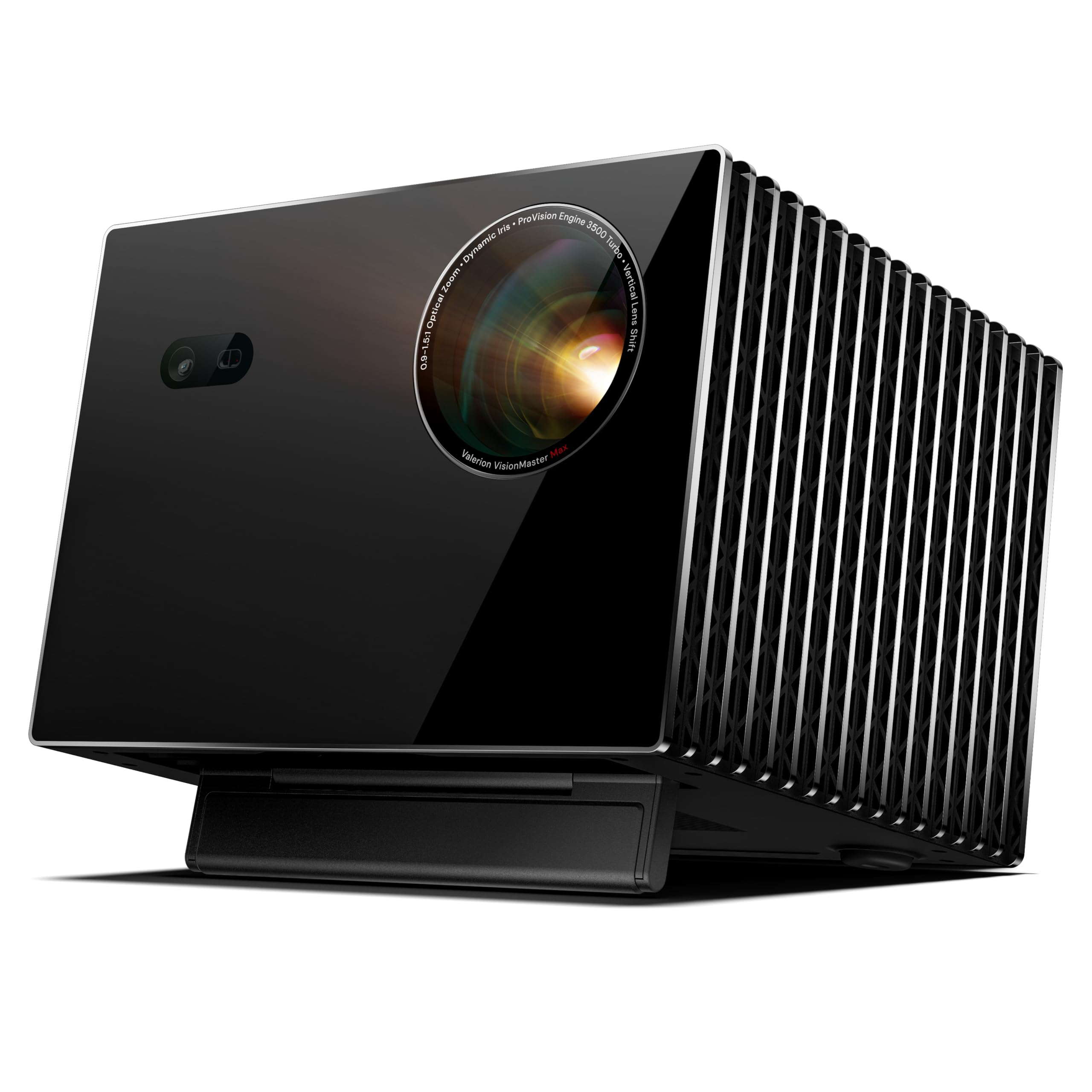
- Gaming Mode supports 4ms @240Hz responsiveness.
- Its optical zoom and lens shift give flexibility when arranging a projection setup.
- Built-in Google TV provides access to streaming apps.
Best Gift For: Gamers who want a large-screen home entertainment setup for gaming and movies.
SteelSeries Arctis Nova Pro Wireless Headset

- Connect two systems at once and toggle between compatible gaming platforms.
- Active noise cancellation detects and reduces distracting noises; Transparency Mode lets you hear your surroundings.
- Hot-swappable batteries let a player switch to the spare during a session.
Best Gift For: Players who move between PC, PlayStation, Switch, or Mac and want to connect two systems at once.
SteelSeries Apex Pro TKL Gaming Keyboard

- Per-key actuation settings offer control over how keys respond.
- A key can be programmed for two different actions.
- The keyboard has a detachable USB-C connection.
Best Gift For: PC gamers who like adjusting key response for different controls and actions.
FIFINE AmpliGame AM8 Gaming Microphone

- USB and XLR connections support different audio setups.
- A tap-to-mute button and gain knob keep key controls at hand.
- RGB lighting can be changed with the RGB button when connected by USB.
Best Gift For: Gamers starting a streaming, podcasting, or voice recording setup.
SteelSeries Aerox 3 Wireless Gaming Mouse

- Wireless connectivity includes 2.4GHz for gaming and Bluetooth 5.0.
- The mouse has a 68g holey shell design.
- The interior is shielded from water splashes, dust, and dirt.
Best Gift For: Gamers who want a wireless mouse with both 2.4GHz and Bluetooth connectivity.
Nylavee Desktop Computer Speakers

- The speakers include six touch-controlled lighting modes.
- A single knob controls power and volume.
- Audio connects through a 3.5mm cable, with USB used for power.
Best Gift For: PC gamers who want wired speakers for games, videos, and music at their desk.
HUANUO FlowLift Dual Monitor Stand

- The arms support compatible computer screens from 13–32″.
- The stand offers tilt, swivel, and rotation adjustments.
- Cable management guides wires along the arms.
Best Gift For: Gamers with compatible dual monitors who want to free up desk space and adjust screen positions.
Choosing gifts for gamers around the way they play
When choosing gifts for gamers, start with the recipient’s actual routine. Someone who plays on a console and PC may appreciate a flexible audio setup, while a streamer may get more daily use from an easy-to-reach microphone control.
Think about what they use most, rather than assuming every player wants the same kind of upgrade.
Notice whether their setup is shared, compact, or already crowded. A desk accessory can be useful when it fits the available space, while a room-scale entertainment gift needs room planning and suitable connections.
If you can, discreetly check the devices and setup they already use before deciding.
Consider what would solve a small frustration. They may have to switch between systems, want clearer voice capture, or prefer moving a screen out of the way.
A gift tied to a real habit feels personal without requiring you to guess at a specific game or play style.
Balancing a gaming gift budget
These gifts span modest desk additions and larger home entertainment upgrades. Set a comfortable budget first, then compare the kind of improvement each option might offer: convenient sound, a more flexible workspace, or a new way to enjoy games together.
Check actual prices before buying, since they can change.
A lower-cost accessory can still feel thoughtful when it solves something the recipient mentions often. A larger purchase deserves more research, especially if it depends on other equipment or a particular room arrangement.
Ask yourself whether the gift will work with what they own and whether they have space to use it.
For a group gift, pooling contributions may make a substantial setup upgrade more practical. For an individual gift, a smaller piece that complements existing gear can be a safer choice.
In either case, leave room in the budget for any compatible accessories the recipient may need.
Personalizing and presenting gifts for gamers
Personalization starts with paying attention. Ask which platform they play on, whether they use speakers or headphones, or what part of their desk they wish were easier to manage.
Those casual questions can point you toward a gift that fits their habits without giving away the surprise.
For gifts for gamers, presentation can connect the item to a shared moment. Pair a desk upgrade with a handwritten note about a planned game night, or wrap a streaming accessory with a message celebrating a creative project.
Keep the note specific to the person rather than making broad claims about performance.
If the gift needs setup, offer help only if they would welcome it. Some people enjoy configuring their own equipment; others appreciate having a second pair of hands.
Keep packaging and receipts accessible in case they need to check compatibility or make an exchange.
Last-minute gifts for gamers: check fit and timing
For last-minute gifts for gamers, prioritize a product that clearly matches the recipient’s existing equipment and routine. Before placing an order, verify compatibility, dimensions, connection types, and any desk or room requirements using current product information.
A quick check can prevent a well-meant gift from becoming an awkward fit.
Delivery estimates vary, so check the expected arrival date for the recipient’s address before relying on an item for a celebration. If timing is tight, a card explaining the planned gift or a digital note about a shared shopping trip can preserve the occasion without making a delivery promise.
Keep the wrapping simple if the recipient may want to inspect model details or compatibility. Include a brief personal note about why you chose it, and save the order information where you can find it.
That practical follow-through makes a rushed purchase feel considered.